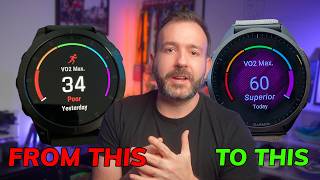
How To Increase VO2 Max Running Garmin: A Step‑by‑Step Guide
If you are a runner who relies on a Garmin watch, you already have a powerful tool for measuring your aerobic fitness. VO2 max—the maximum amount of oxygen your body can use during intense exercise—is one of the most reliable indicators of endurance performance. In this article we explain what VO2 max is, how Garmin calculates it while you run, and the most effective training methods you can apply to raise it.
What Is VO2 Max and Why It Matters for Runners?
VO2 max is expressed in milliliters of oxygen per kilogram of body weight per minute (ml/kg/min). A higher value means your cardiovascular system can deliver more oxygen to working muscles, which translates into faster race times and improved stamina. While genetics set a baseline, most runners can improve their VO2 max by 5‑15 % with targeted training.
How Garmin Measures VO2 Max While Running
Garmin devices use a combination of heart‑rate data, GPS speed, and elevation changes to estimate VO2 max. The algorithm compares your real‑time effort to a large database of laboratory‑tested athletes, then generates a score that updates automatically after each qualifying run.
Key Garmin Features for Accurate VO2 Max
- Heart‑rate sensor – Chest straps or optical wrist monitors provide the raw data needed for precise calculations.
- GPS accuracy – A strong satellite signal ensures correct speed and distance, which are essential for the algorithm.
- Activity profile – Selecting “Run” instead of “Walk” or “Hike” tells the watch to apply the running‑specific VO2 max model.
- Auto‑pause and sleep tracking – Reducing false data points improves the reliability of the estimate.
Proven Strategies to Increase VO2 Max Using Garmin Data
Once you understand how Garmin reports your VO2 max, you can use its insights to shape a training plan that targets improvement. Below